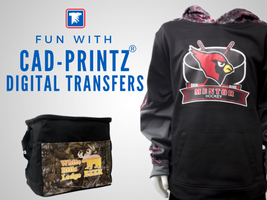
Going digital opens up a realm of possibilities in your everyday life and also when decorating apparel with CAD-PRINTZ®.
This week we are having fun creating a few apparel samples using CAD-PRINTZ digital heat transfers to display for our show room! We want to share these with you to give you inspiration when creating your apparel.
Your most basic decorating with your heat press will be done using blank t-shirts and sweatshirts. Traditional methods of printing like screen printing or screen printed transfers work well with these items. That is until your artwork has several colors, photographic images, shading, fading, and other special effects making traditional methods of decorating either very difficult.
CAD-PRINTZ® Express Print
With full color artwork or spot color artwork with many colors, the best way to keep your costs down when getting heat transfers printed is to go with digital transfers like CAD-PRINTZ® Express Print.
Express Print is the most economical choice for printing full color graphics onto cotton, polyester or cotton/poly blend apparel. The most popular are t-shirts, hoodies, aprons, and canvas tote bags. The design below has 5 colors making it a perfect candidate for using digital printed transfers as opposed to screen printed ink transfers.

CAD-PRINTZ® Opaque
Our next samples we are creating on our heat press is for performance apparel using CAD-PRINTZ® Opaque heat transfers. These are the most versatile of digital transfers. Specifically the Opaque material has extreme stretch capabilities as well as being able to apply to hard-to-print on materials like Nylon or Spandex.
Next time you’re looking for a full color graphic to print on specialty fabrics, choose CAD-PRINTZ Opaque. You’ll see why it’s one of our favorite transfers to use for heat printing.


CAD-PRINTZ® SUB BLOCK
Not only are heat transfers going digital and being printed using computer graphics, so are the blank apparel we use to decorate. The hot trend right now is apparel in different patterns like CamoHex or traditional camouflage patterns. See the cooler bag in the below image.
Even if the fabric isn’t using the sublimation decorating method, some polyester fabrics have a better chance of the ink “bleeding” through the graphics. Sub Block solves this problem by blocking the sublimated inks from bleeding into the print.
This bag shows how vibrant and opaque the print is using CAD-PRINTZ Sub Block to heat apply onto a patterned fabric.

We are hoping you enjoy these inspirational pieces we are creating for our show room! We can’t wait to see what you’re going to create using digital transfers!

Get Help Choosing the Best Heat Applied Transfer for Each Job
Please let me know if there is a special ink requirement to use on firemen’s t-shirts? Is there an issue of flash back with any of the inks? Thank You, Melodye, Lee’s Sporting Goods
We’re going to look into this for you and be back to you with an answer.
Hi, Melodye. Thanks for your patience. Our resident expert says that people serving this space use Goof Proof. We have MSDS sheets available if you want to check for any special concerns, such as flashback. Hope that helps!
I went to your website but couldn’t locate the MSDS sheets. Where are they located?
Thank You,
Melodye
Melodye, they aren’t listed online. You can email info at transferexpress.com and ask for the particular sheets you need.
Thank You!
Do you guys sell like a roll of the cad prints sub block? If so,where do I located them on your website.
Sub Block is a custom transfer sold as a ready to apply transfer
Is there a way to remove these from an article of clothing after they have been applied?
Hi Maria,
You can try this solvent sold through Stahls’:
https://www.stahls.com/lettering-remover-solvent
I was looking for something like this, thanks a lot for sharing!!
I’m genuinely impressed by the quality of your content –nice one, keep sharing